Your Redirect Map Is Worth More Than Your Theme
A re-platform can hand back the organic traffic you spent a decade earning. Here’s how to protect it — in Google and in the AI engines...
Contents
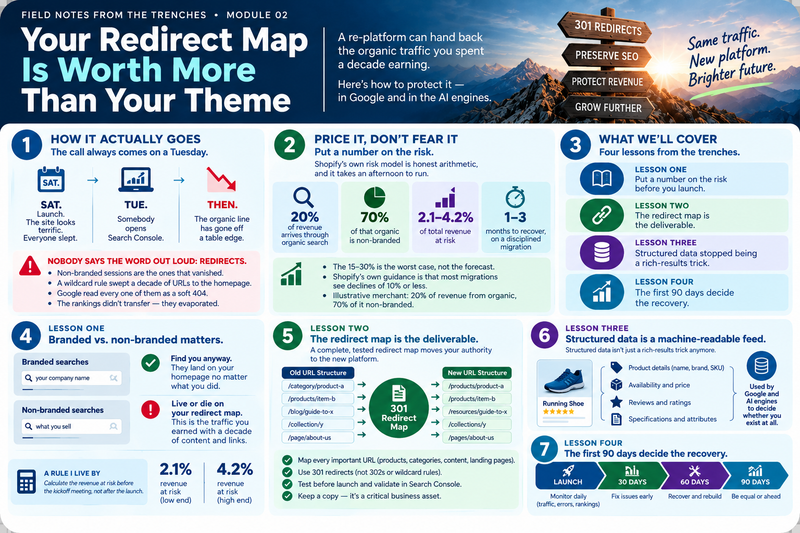
The call always comes on a Tuesday.
Launch was Saturday. The site looks terrific. Everyone slept.
Then somebody opens Search Console, and the organic line has gone off a table edge.
Nobody in the room wants to say the word out loud. Redirects.
In Module 01 I called the storefront the tip of the iceberg — 20% to 30% of a re-platform, with the rest below the waterline. This module is about the one line item down there that can cost you the most, because it’s the only one your competitors get to keep if you drop it.
I’ve run Shopify migrations, and I spend my days now on search and AI-search visibility: redirect maps, schema, citations. So take this from someone who has actually run the business:
“Crawlers don’t care about your new theme. They care about whether the URL that ranked last week still leads to the same thing.”
Four lessons. Then the question I’d ask if I sat on your board.
Lesson One: Put a number on the risk before you launch
The horror stories are real, but they get told badly. “Migrations tank your traffic” isn’t a fact. It’s a description of what happens when nobody owns the URLs.
Price it instead. Shopify’s own risk model is honest arithmetic:
Revenue at risk
Share of revenue from organic × share of that organic that is non-branded × 15% to 30%.
The 15–30% is the worst case, not the forecast.
Branded searches find you anyway — people typing your name land on your homepage no matter what you did to /shop/category/. It’s the non-branded traffic, the people searching for what you sell rather than who you are, that lives or dies on your redirect map.
Run it on a merchant doing 20% of revenue through organic, 70% of it non-branded: 2.1% to 4.2% of revenue at risk, recoverable in one to three months. Shopify’s own guidance is that most migrations see declines of 10% or less.
That’s a number you can take into a budget meeting. “We might lose some traffic” is not.
A rule I live by
Calculate the revenue at risk before the kickoff meeting, not after the launch.
A board that has seen the number funds the redirect work. A board that hasn’t will cut it to pay for photography.
Lesson Two: The redirect map is the deliverable
Google’s site-move guidance says it plainly: “Don’t redirect many old URLs to one irrelevant single URL destination, such as the home page of the new site.”
That’s the single most common failure I see. A wildcard rule sweeps a decade of product and blog URLs onto the homepage, someone calls it “handled,” and Google reads every one of those as a soft 404. The ranking doesn’t transfer. It evaporates.
The map takes five steps:
Inventory every URL. Search Console, Semrush or Ahrefs, your XML sitemap, and the legacy database. Historical URLs count — old pages still carry links.
Clean it up. Kill duplicate paths, trailing-slash mismatches, and parameterized tracking junk before you map anything.
Map 1:1 with permanent redirects. Every legacy URL to its real equivalent, 301 or 308, straight to the final destination. No chains.
Check canonical parity. Every new URL gets a self-referencing canonical that matches the redirect target. Mismatches create indexing loops.
Crawl staging against the old list. Screaming Frog against your legacy URL export, before go-live, finds the unmapped pages while fixing them is still free.
On Shopify, the structure itself guarantees work. Products live under /products/, categories under /collections/, posts under /blogs/blog-name/article-title. Almost nothing on your old platform matches that, so nearly every URL needs a row in the map. Standard plans hold up to 100,000 redirects and Plus up to 20 million — if you’re over the line, prioritize by organic revenue, not by alphabetical order.
Then leave them alone. Google’s advice is to keep redirects live at least a year. I’d say leave them forever; they cost nothing.
A rule I live by
If a URL isn’t on the map, it isn’t launched.
I’ve never regretted holding a go-live for a redirect file. I have regretted the opposite.
Lesson Three: Structured data stopped being a rich-results trick
For fifteen years, schema markup was something you did for a star rating in the search results.
That era is over, and most SEO advice hasn’t caught up.
Your structured data is now a machine-readable feed — read by Google for merchant listings, and read by ChatGPT, Gemini, Perplexity and AI Overviews when they decide which products to name in an answer. These engines pull facts from JSON-LD rather than guessing from your HTML. If your schema breaks during migration, you don’t drop a few positions. You stop being quotable.
What each markup earns you
That last row is worth your attention. Plenty of migration checklists still promise FAQ rich results. Google turned them off. Budget accordingly.
One honest note on timing. Google says new URLs replace old ones in its index over a few weeks or more, depending on your size. The AI engines publish no schedule at all. Anyone quoting you a precise number of days for ChatGPT to re-cite your catalog is guessing. Plan for weeks, and verify the way I do: ask the engines the questions your buyers ask, and watch for your name to come back.
Lesson Four: The first 90 days decide the recovery
Cutover isn’t the finish line. It’s the first day of the only period that determines whether this project pays for itself.
The post-launch watch
Expect a dip in weeks two through six while engines recrawl and re-index. It isn’t a failure; it’s the cost of moving. Most disciplined migrations stabilize within one to three months, large catalogs can take up to six.
And during the recovery window, resist the urge to “fix” things by rewriting content. Change five variables at once and you lose the ability to tell which one mattered. Discipline now is what buys you an honest answer later.
If I Sat on Your Board: The question I’d ask
Not “when do we launch.” Not “do we like the design.”
Show me the redirect map. Then tell me what traffic dip we’ve budgeted for, and when we expect to be whole.
If the answer is a spreadsheet and a number, you have a plan. If it’s a reassurance, you have a theme and a hope.
Your next step
This week, before anyone talks design: pull the URL inventory. Search Console, your SEO platform, the XML sitemap, the legacy database. One list, deduplicated, ranked by organic revenue.
That list is the spine of the whole migration. Everything else in Module 01’s cost stack bolts onto it.
Your theme has a shelf life — you’ll replace it in three years and barely remember this one. Your URLs don’t.
Protect the map. The rankings follow.
Next in this series — Module 03: Middleware — The Key to Effective Integration and Project ROI The layer between your storefront and your ERP is where integration budgets go to die, or where they pay for themselves.
About the author
Gary Q. Smith — President, GQS Direct, LLC
Gary pairs four decades of P&L-accountable direct marketing leadership with practitioner-level command of today’s commerce stack. He is currently an AI evangelist and practitioner and has led four e-commerce website implementations and integrations, built marketing databases, was architect and project leader for a custom ERP system, and managed omnichannel marketing strategy and communications for several businesses.
Most consultants have studied these problems. GQS Direct has owned them.
Start with a complimentary consultation →
The E-Commerce Implementation Series
Module 01 — Re-Platforming Is a Systems Project, Not a Web Design Project
Module 02 — Your Redirect Map Is Worth More Than Your Theme (you are here)
Module 03 — Middleware: The Key to Effective Integration and Project ROI
Module 04 — The Open-Source Paradox: Hidden Maintenance and DevOps Costs
Module 05 — Your B2B Buyer Is Not a Consumer With a Bigger Cart